
Tech Explained to Non-Technical People: Understand Engineering, the Jargon, and How Teams Actually Work, Pain Free

I’m going to write a series of blog posts to help non-technical people understand more about what’s involved in tech.
This is for you if you are thinking about doing a career in tech management, if you want to understand what your engineering team does, or if you are transitioning into a job that requires you to know more about tech.
I am not going to teach you how to code, because in 99% of the cases, engineering is not about writing code, but thinking about and managing systems together. Think of an orchestra, the music sheet is the code, the players are the systems, and the conductor is the engineer’s role.
One important note: most engineers love humour; memes have become the preferred way to communicate this humour. You have to adapt to it, and hopefully, you will understand more of those memes after reading those posts. And yes, I’m an engineer, you will have some of those, I’m not apologising.
This blog is the first part, and will focus on the engineering loop, the tools being used and the most basic words you have to know.
Intro to the loop
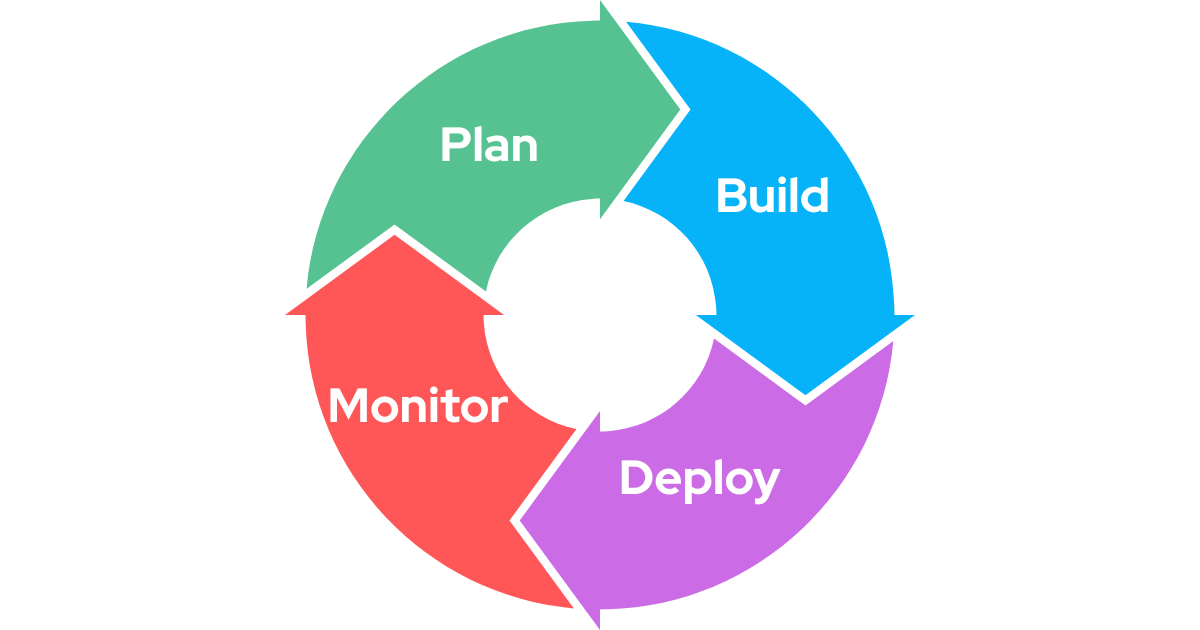
Engineering is a loop that can be divided into four: Plan, build, deploy, and monitor. Each of those steps has its associated tooling to help with the job.
There are lots of ways to go through this loop; many people have (in my opinion) overcomplicated it with mental models and organisational structures for this loop (agile, scrums, kanban, etc). What’s important is that, no matter how many meetings or processes you have around building apps, they can all be simplified to those four steps.
Planning
I can find tons of quotes; there’s a good reason people love plans. Whether you stick to it or not, having a plan is always better than not having one.
Shameless plug, Ansearch is helping at this stage of the loop (we are a customer intelligence tool) by automating this step; we reduce bias, errors and organise the ticketing systems, so you are sure to build what customers need. And this is surprisingly difficult for people and organisations to differentiate between what their customers want, and what their inner voice (or boss) wants.
Product documents & documentation:
One of the hardest parts of engineering is how complex systems can become. No human is able to remember every bit and piece of a software, so documentation is primordial. Engineering teams are usually light years ahead of other business functions when it comes to this, given how important it is. This can go from simple text files (markdown) to advanced website builders.
Markdown is a file format optimised for speed of writing (this website is built with it). Symbols indicate how text should be rendered (eg, # is for a title, > for a quote, ** for bold, etc.)
Some of the most used tools in this area are:
- Notion, Confluence, Coda, and Obsidian: those are mostly text editors; they have many usages, sometimes outside of the engineering world. They are mostly used to document non-engineering bits (management, product requirements, etc).
-
Swagger, Postman, Redocly: Swagger/OpenAPI documents are a standard, and Swagger is the company allowing you to display those documents. Those documents are usually not edited by humans, but constructed automatically from code. The role of those tools is to explain how to interact with another server through contracts (“give me this data, I’ll return something else”). Those contracts are called APIs for Application Programming Interfaces (I’ll talk about them in another post).
-
Docusaurus, and alternatives: Those are actual websites, sometimes integrated into the main product being sold. Their purpose is to explain to other engineers how to use or interact with what has been built. Sometimes, those are integrating Swagger directly, instead of having two separate tools. You use them only when the documentation is meant for external people, as they are a lot more involved than the other two.

Task management
The main tools being used are Jira and Linear (and, less often, GitHub projects).
Those tools are ticketing systems (a ticket = a task to execute). Those tools are essential to distribute the work in a team, and to know who is working on what. Tickets are usually the main source of information for an engineer to understand what they have to do and why, so it’s important to make them detailed.
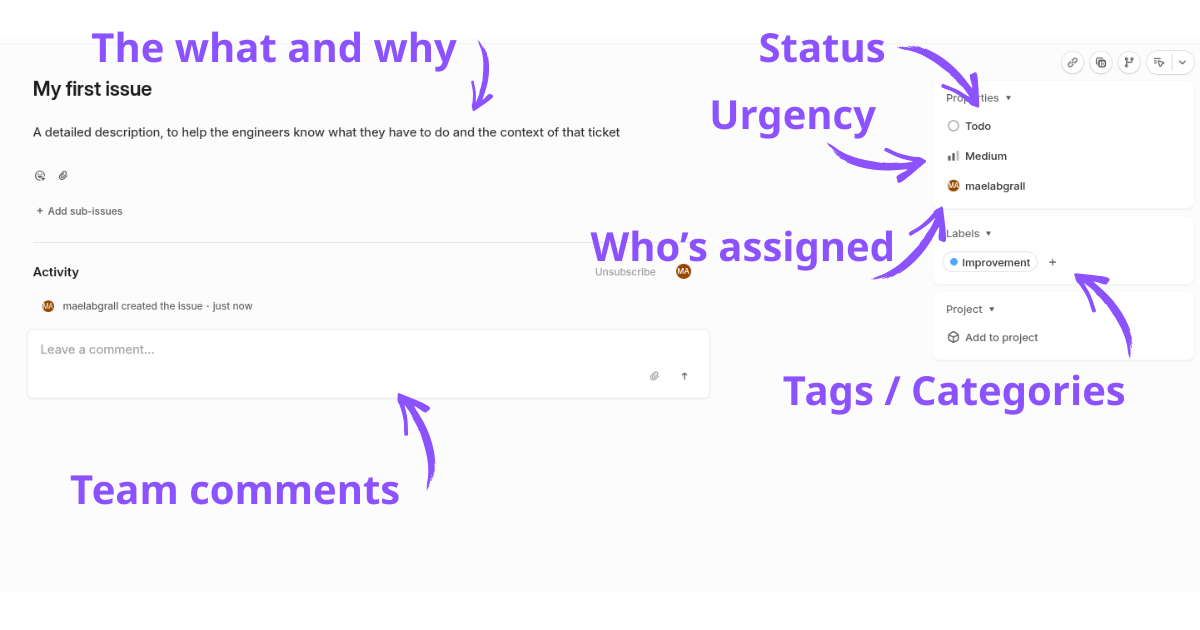
Tickets have statuses to indicate what is going on:
- Backlog is for tickets not being worked on at the moment, because they are not urgent or the team does not have the time to address them. A major job for the team is to keep this backlog organised and avoid it blowing up. Too many tasks = reduced morale and harder to organise.
- Todos for tickets that will be worked on as soon as an engineer is free.
- In progress / In review: for tickets, someone is actively working on, or is waiting for another engineer to review their work
- Done: the task is completed
Interface & visuals
Engineers have a varying level of “good taste”. This is why it’s also very important to plan for how an app will look, how it will behave and how users will interact with it.
Again, the tools used for this part of the loop vary from a simple sheet of paper to very advanced tools. We will focus on only two for now, as they are among the most standard to see in the industry:

Figma: Figma is a tool to create interfaces. You drag and drop text, squares, and images, organise them and create wireframes (wireframes are empty boxes, to help understand how preliminary designs will look) or a fully fledged interface.
V0: Originally, V0 is an AI to build websites, and it’s still good for this. However, this tool is becoming more and more used to help build interfaces. The main difference with Figma is that V0 produces actual working code, meaning what is being built with it is a lot more interactive, and can be completely copied and pasted by engineers. You also do not need to know how to use Figma to create prototypes, which means it’s a lot faster to get started.
Building
Now it’s time to build! There are a myriad of tools being used by engineers, so I will focus only on the ones that are always present:
Editors and command line (CLI)
Code editors help engineers tremendously in their work: they turn a simple piece of text into something deeply interactive.
Code is made with words. Editors render certain words with colours to help understand what those words mean and how they are used; it provides a visual hierarchy.
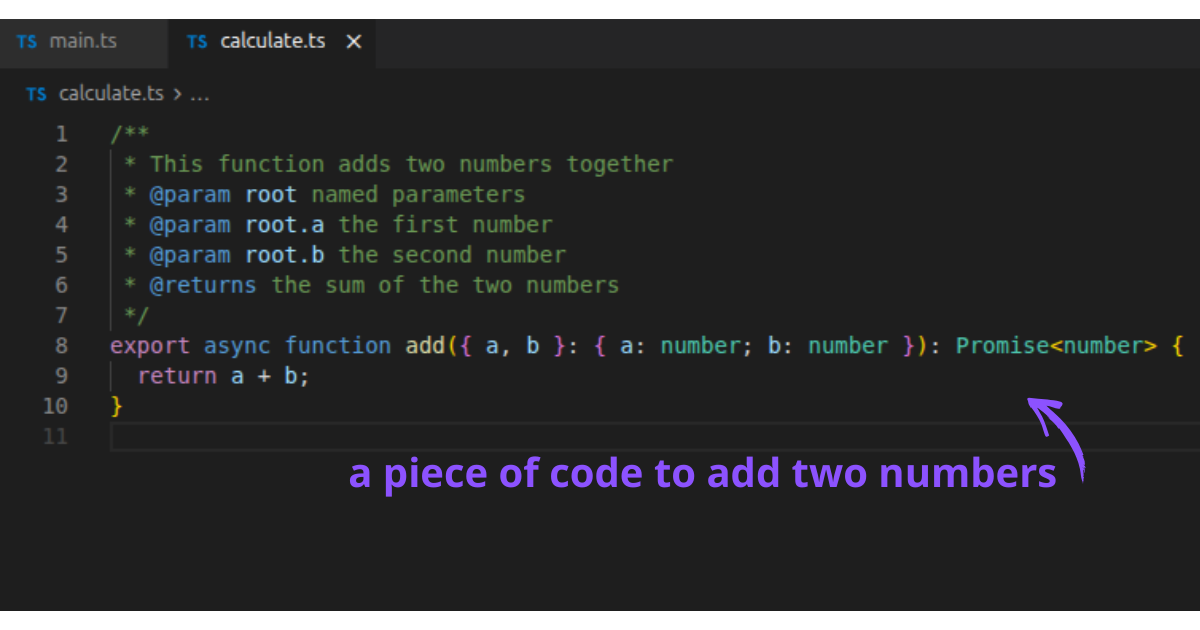
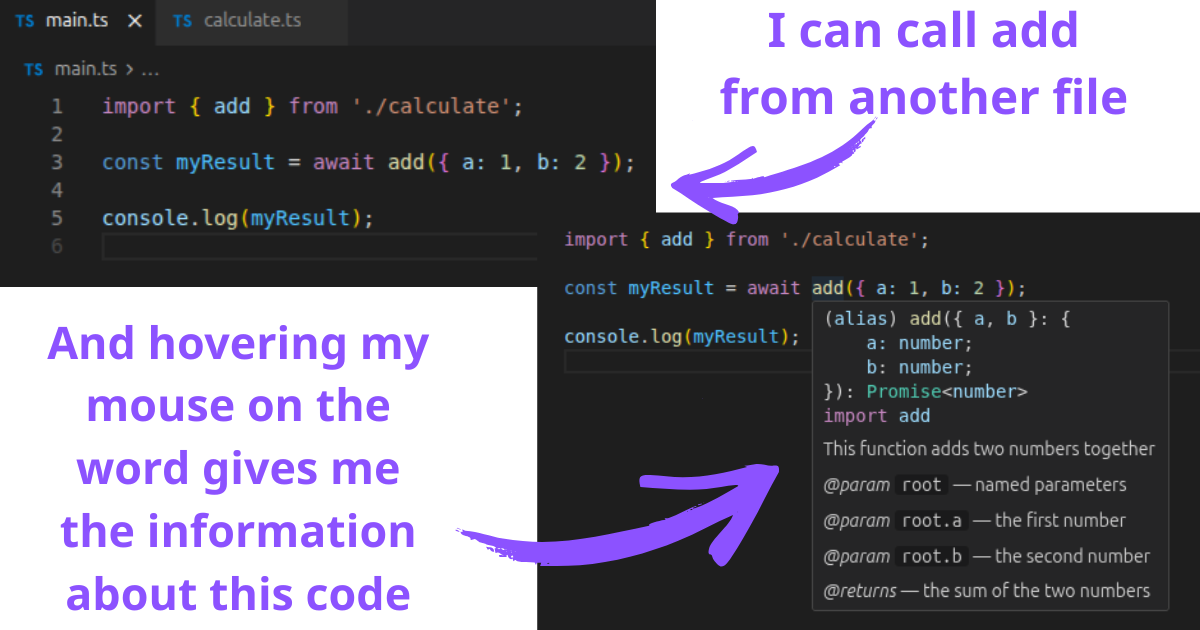
Code is also deeply interlinked, and editors help engineers see those links easily: if you are using a piece of code from another file, the editor can show you where this is coming from, and documentation linked to it
The command line is how engineers can interact with the system using just words. They predate visual interfaces
visual interfaces started around the 70s, and Apple was the first to really make them mass adopted in 1983-1984. So 30 to 40 years after the first digital computers.
The command line is still being used extensively today because it’s much faster to use (when you know how to) than having to click with a mouse. That’s about it.
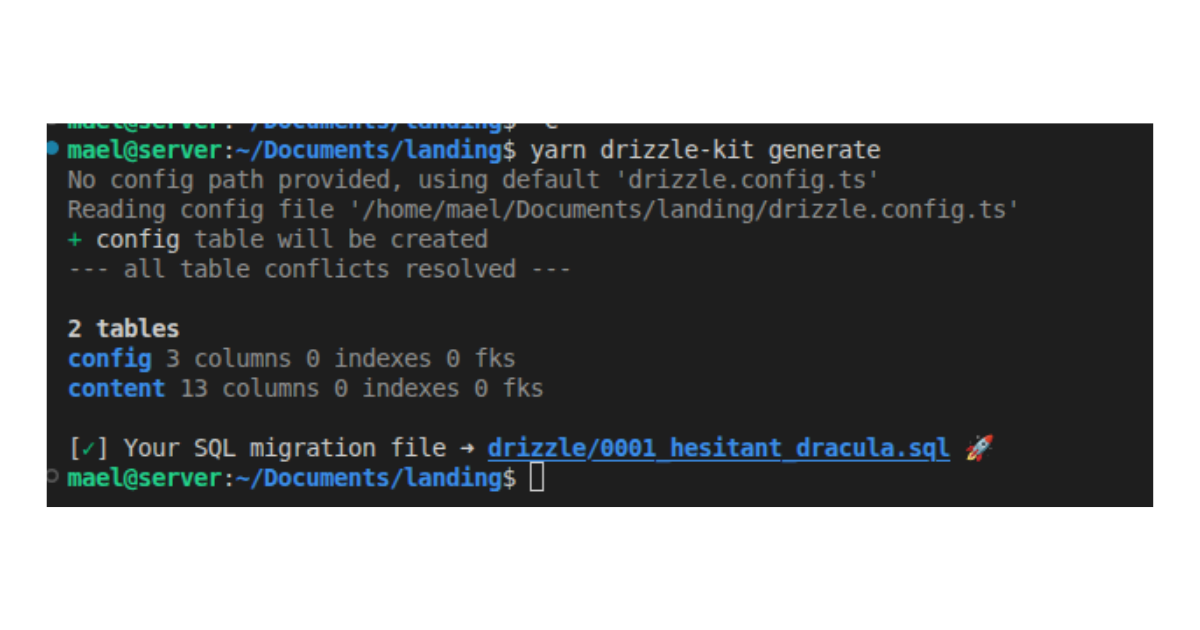
CLI (for command line interface) is a program that is made exclusively for being used from the command line: they have no visual interface. In this screenshot, I called a program to create some code
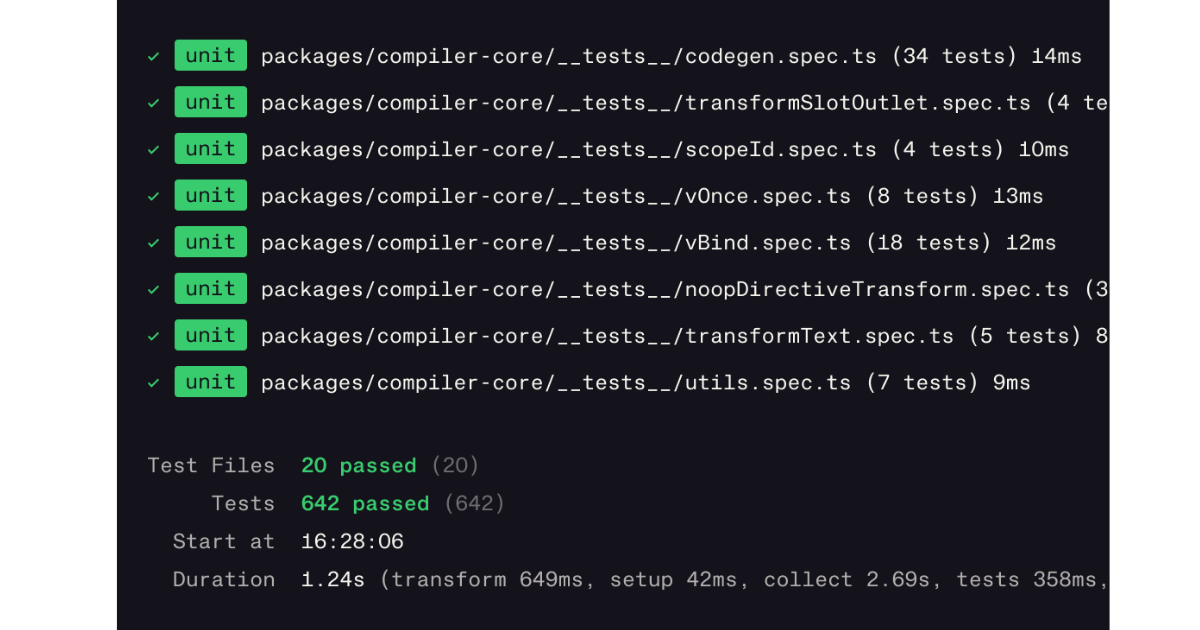
image of Vitest, from their documentation
Testing
Good engineers always test their code. Those tests are mostly automated, and will try every edge case for a piece of code.
While not immediately obvious (if it works, why test it?), Tests become very important to avoid bugs in the future: when doing maintenance, a failing test indicates the behaviour of the code has just changed. When you have millions of lines of code, this is your only way to detect something broken when modifying code.
This is key for quality assurance (ensuring the software keeps a high quality over time).
Git & code repositories
Once the work is done, you need a way to store the code. Git is a program that helps with that (it was invented by the same person who invented Linux).
The way git works is rather simple: you have checkpoints (called commits), branches (a branch means the code is evolving in a separate “workspace”, thus it does not interfere with the other branches), and a remote repository (where the code will be sent).
Repositories are where the code is stored. Many services are offering repositories, the most notable ones are GitHub, GitLab, and Bitbucket. Those services also bundle the repositories with other very useful services for deploying and monitoring code.
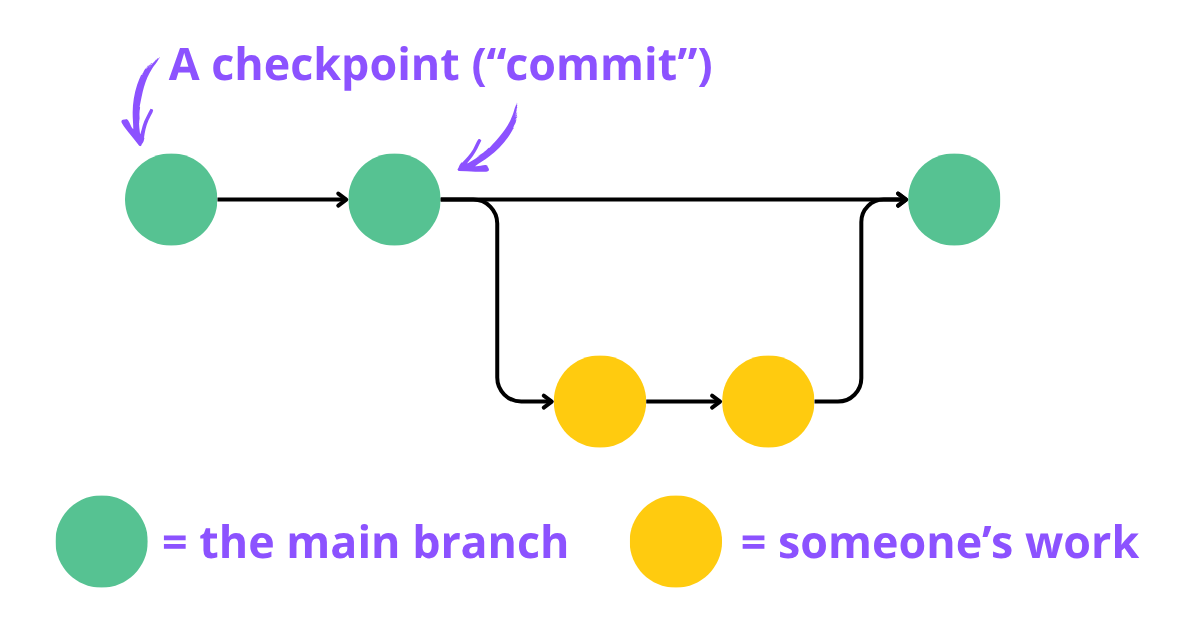
Branches are then merged into the “main branch”, the main branch representing the code that is served to customers. To do so, engineers have to create a PR, or Pull/Push request (there is no standard here; essentially, you are just “requesting” the team to review your code and merge it)
Reviews
When working in teams, an important part of good quality is to review the code: another engineer will come and verify the code meets a standard (this standard is directly related to the skill level of the team; good teams made of juniors always have a higher standard than a bad team of seniors). The person (or multiple persons) doing the review will add comments and request the code to be improved, or accept the request and merge this code into the main branch.
It’s also a place where some engineers can be very vocal; lots of drama happens in open source projects in those reviews, because, again, the quality of the project is directly affected by the quality of the review.
Deploying
The next part of the engineering lifecycle is to deploy this code. There are two ways to deploy it:
- As an app (painful, slow)
- As a web app (instant, very easy)
- As a server (instant, very easy)
Unfortunately, in most cases, you do not choose where you deploy: if your customers are used to a mobile app, you will have to deploy a mobile app. However, whenever you can, it’s better to have as much as the logic live in a web app or server, to reduce the problems linked to normal apps.
Before we dive into the details of deployment, it’s important to note that in bigger teams, this is usually the job of dedicated engineers, as it can become complex very quickly.
The native app
By app, I mean an application that can be downloaded on a device (computer, phone, or even a small electronic device). Those are called native apps.
The advantage of apps is that they can work completely offline (for example, a calculator app). The major disadvantage of apps is that deploying them is extremely difficult, and it cannot be reversed (once it’s out there, it’s out there).
There are two great difficulties:
- Everyone has a different device configuration (less the case for iOS and Mac apps), so what works with computer A or your phone may not work with another.
- Everyone has a different schedule for updating the application. The worst is Microsoft Windows apps (different from Windows store apps), where people essentially update whenever they want. So your app (if it works online) has to be able to work with both the new version and the old version, and sometimes a version that is several months old (Jim didn’t want to update the app; Jim still uses Windows Vista in 2026).
Native apps are distributed on:
- The app store for iOS.
- The Windows Store, or by direct download on Windows.
- Various stores on Android, mainly the Play Store.
- A gazillion stores on Linux (this is also where the “store” is coming from).
- No idea on Mac, I hate Mac.
The web app and progressive web app
With the arrival of powerful web browsers, a new way of building apps arrived: the web app. Those are applications that live entirely in your browser. A good example is Google Docs.
Web apps are very easy to update: whenever a user goes on your website, they get the latest version of the app. You made a mistake? You can revert it in just a few seconds.
The downside of web apps is that they do not have as many capabilities as native apps, or they are less efficient (for example, while you can run a video game in the browser, it’s not going to be as good as running it directly on your computer).
Progressive web app are a specific type of web apps that try to bridge the gap between a native app and a web app, by allowing it to work offline (still in the browser, but works even when there is no internet), or in the case of android, installing the web app just like a normal app (you get an icon like native apps, and you do not need to pass through an app store). However, mobile users do not understand progressive web apps well.
Web apps are also called frontend by engineers.
To distribute web apps, you can either bundle them with your server or use dedicated services. The services are the same as the servers.
Servers
Native apps and web apps are still facing a problem: devices have a limited amount of storage and processing power. It’s also tedious to transfer your data from one device to another.
Servers allow you to have virtually unlimited storage and processing power. They also allow you to access your data from multiple devices (eg, look at your emails from your desktop, then go read them from your phone).
They are relatively easy to deploy and update, and like web apps, it’s possible to reverse any deployment issue.
Server code is called “backend” by engineers.
To deploy code on servers, you have multiple options:
- On the public cloud: those are companies dedicated to servicing computers for you. You rent computers by the hour, and in exchange, you do not have to manage anything. This is the easiest and most secure option, as your team will not be in charge of updating and securing the server.
- On “private cloud”, this is the same as public cloud, and a pure business-to-business way of doing deployment. What it means is that instead of being your cloud, the server will live in the cloud of your customer. It’s more involved than public cloud, but it can reassure them about privacy since they have more control over what happens.
- On-premises / on metal / Self-hosted (the most hated one, because it’s essentially as hard as a native app). Avoid on-premises like the plague. Anyone still using this in 2026 needs to burn and is delusional. It’s less secure than any other option, and very tedious. The only exception is for engineers building their own apps and the sole user. I’ll go into more details on why in another blog on buy vs build, the short version is you do not want to manage that, ever.
The biggest cloud companies are Amazon (through Amazon Web Services or AWS), Microsoft (through Azure) and Google (through Google Cloud or GCP). Some much smaller companies exist (dedicated to hosting), but are regional. Choosing the smaller companies is a risk, as hiring someone who knows those platforms is rare, and those platforms are usually more involved than the big three cited above.
Some contenders are becoming more and more popular because they offer a platform even easier to use than the big clouds: Vercel and Cloudflare. They, however, have a smaller offering, or, in the case of Vercel, a big price tag.
CICD (continuous integration, continuous deployment)
To deploy the apps, engineers have built pipelines to automate as much as possible.
What this means is that whenever new code is available in the repository, the applications are automatically deployed.
DevOps and DevSecOps
The engineers working on the CICD pipelines and the deployments are called DevOps and DevSecOps engineers. Their job is to ensure the pipelines are fast and the deployment is working as intended.
They also ensure that the code is deployed in a secure way, and sometimes take care of the next big part of the engineering loop: they monitor the applications.
Those engineers are rare in smaller companies, or only consultants, as they are needed only when it becomes complex to deploy or monitor applications. The two platforms cited before (Vercel and Cloudflare) have made their moat specifically around avoiding hiring any DevOps engineer: any engineer is able to deploy on those platforms with minimal skills required.
Monitoring
The last stage of the engineering loop is to monitor the application.
There are roughly three reasons to do so:
- Catch any bugs happening to the users
- Track consumption of the resources (how many servers, are they underused, etc.)
- Understand how the product is being used (are users happy, do they understand the app, etc), and for marketing purposes (understanding how people discovered the application, how long they watch a specific page, etc).
To catch bugs, the most common app being used is called Sentry: when a bug happens, it will store as much information as possible about how and when the bug happened, and notify the engineers.
To track consumption of the resources, many tools exist, the most widespread being Datadog.
For product and marketing, there are a lot of tools available: Posthog, Mixpanel, Hotjar, Segment, etc. Those tools are called “analytic tools”. Google Analytics is one of those tools; we think it’s important to note that the default configuration is not compliant with the GDPR.
The information gathered in those tools is important when coming back at the beginning of the loop: they help make informed decisions when planning.
That’s all for today!
We will continue posting blogs around tech, some of which will cover “Build vs buy vs partner vs simply say no”, the various data storage types and how to choose them best, wrappers, frameworks, libraries, APIs, MCPs and open source.
If you want us to talk about anything specific, you can always send us an email at contact@ansearch.ai
– Mael